
The Agile Enterprise Guide: EAA Compliance in 2026
The Regulatory Baseline Has Shifted.
The European Accessibility Act (EAA) is no longer a distant milestone; since June 2025, it has been legally applicable. For UK Enterprises and Public Sector bodies, understanding the specific application of these rules is critical for operational resilience.
This guide outlines your core obligations and the strategic actions required to ensure your digital estate is compliant, robust, and future-proof.
Disclaimer: This guide provides operational guidance and does not constitute legal advice.
Strategic Context: Does This Apply to UK Business?
The Short Answer: Yes.
The Explanation: Application depends entirely on your market reach.
JBi Strategic Insight: The UK vs. EU Distinction
Do not assume Brexit provides an exemption.
- If you sell to the EU: The EAA applies extraterritorially. If you provide e-commerce goods, banking services, or digital products to EU consumers, you must comply with the EAA.
- If you trade only in the UK: You are governed by the Equality Act 2010 (Private Sector) or PSBAR 2018 (Public Sector). While the EAA is not domestic law here, the technical requirements are very similar.
The Strategy: Aligning to EN 301 549 / WCAG standards protects your operations in both markets, ensuring a robust, inclusive digital service.
1. The Standard: EN 301 549 (And the 2026 Update)
The Standard: EN 301 549.
The Definition: This is the overarching European standard for digital accessibility. For websites and mobile apps, it explicitly adopts the Web Content Accessibility Guidelines (WCAG) as its technical baseline.
The 2026 Strategic Update
While WCAG 2.1 Level AA has been the baseline for years, requirements are evolving.
- Coming in Early 2026: A new version of the standard, EN 301 549 v4.1.1, is in development.
- The Impact: This version is expected to harmonise with WCAG 2.2.
Our Recommendation
If you are commissioning an audit or remediation roadmap in 2026, do not aim for the previous standard.
- Current Baseline: WCAG 2.1 AA (Compliant with 90% of regulations).
- Future-Proofing: Aim for WCAG 2.2 AA. This ensures you avoid a secondary remediation cycle when v4.1.1 is fully harmonised later this year.
Context: The Public Sector Regulations (2018)
The Common Question: “Is the EAA a completely new technical standard compared to the Public Sector Regulations (PSBAR) we followed in 2018?”
The Clarification: No. They are different laws, but they measure compliance using the same technical ruler.
- The Laws Are Different:
- PSBAR 2018: Applies to UK Public Sector bodies (Councils, NHS).
- EAA: Applies to private businesses trading in the EU.
- The Standard Is Aligned:
- Both laws require you to meet EN 301 549.
- Important: EN 301 549 explicitly adopts the Web Content Accessibility Guidelines (WCAG) for web and mobile apps.
The Outcome: If you already meet the Public Sector Regulations (2018), you are effectively close to the technical requirements for the EAA. You simply need to apply these same rigorous standards to your commercial channels.
2. The 4 Principles of Compliance (POUR)
To be legally robust, your digital services must meet these four criteria.
Perceivable
- Requirement: Users must be able to see or hear your content.
- Action:
- Alt Text: Ensure all images feature descriptive text for screen readers.
- Contrast: Confirm text has sufficient contrast against the background.
Operable
- Requirement: Users must be able to navigate without a mouse.
- Action:
- The “Tab” Key Test: Ensure the entire site functions using only a keyboard.
- No “Traps”: Users must never get stuck in a component (like a chatbot) without a clear exit route.
Understandable
- Requirement: Content must be clear and predictable.
- Action:
- Plain English: Avoid jargon. Use clear, concise language accessible to all cognitive abilities.
- Error Prevention: Error messages must explain how to correct the issue, rather than simply stating an error occurred.
Robust
- Requirement: Content must function with assistive technology.
- Action:
- Clean Engineering: Headers, lists, and form labels must be coded correctly for interpretation by screen readers and future browsers.
- Third-party control: your risk increases when accessibility relies on ungoverned plugins and vendor widgets.
Resource: For practical steps, read our Quick Wins Guide:
https://www.jbidigital.co.uk/blog/quick-wins-how-to-begin-making-your-website-accessible/
3. Critical Compliance Areas
The EAA mandates specific standards for high-risk services and content formats. Focus your remediation efforts here first.
E-Commerce & Retail (The Transaction)
- Keyboard Checkout: A user must be able to browse, add to cart, and pay using only a keyboard.
- Form Labels: Every input field (Credit Card, Name, Address) requires a programmatic label so screen readers can identify the request.
- Reflow: Your platform must function at 400% zoom without breaking the layout.
Video & Multimedia (The Content)
- Captions & Transcripts: Synchronised captions are required for pre-recorded video. Additionally, provide a full text transcript for users who cannot access the video file.
- Audio Description: If visual details are crucial and not spoken, a separate audio track describing them is required.
- Player Controls: Media player buttons (Play, Pause, Volume) must be accessible via keyboard.
Documents (PDFs & eBooks)
- Strategic Note: PDF compliance is a frequent failure point in the Public Sector.
- Tagging: A standard “Print to PDF” is rarely accessible. PDFs must be “tagged” (Headings, Paragraphs) to function like a website.
- Navigation: Users must be able to navigate through chapters or sections efficiently.
- DRM (Digital Rights Management): Security features cannot block text-to-speech readers.
4. The Initial Internal Audit
To start your accessibility journey in 2026, you can assess your immediate risk profile without waiting for external partners. Ask your internal teams these three questions:
- “Can I disconnect my mouse and still complete a purchase?”
(Tests Operability & Critical Commercial Paths) - “If I turn off my monitor, does our video content still convey the full message?”
(Tests Audio Description & Captions) - “Do our PDFs have a ‘Title’ and ‘Language’ set in the file properties?”
(Tests Basic Document Accessibility)
5. The Agile Enterprise Delivery Model
How to execute in 2026. While the audit questions above provide a quick check, full compliance requires a structured programme. This is where most organisations fail: not on intent, but on delivery discipline.
Phase 1: Discovery and Risk Baseline (2–4 weeks)
- Automated scans: Identify baseline code issues.
- Manual audit: Test representative templates and components.
- Critical journey testing: Focus on checkout, forms, authentication, and search.
- Output: A prioritised backlog and risk register.
Phase 2: Remediation (4–12 weeks)
- Fix design system first: Resolve issues in your component library to fix once and scale everywhere.
- Prioritise impact: Resolve high-risk user journeys and high-traffic templates.
- Align content: Update content authoring practices.
- Track exceptions: Document rationale for any deferred fixes.
Phase 3: Assurance (2–3 weeks)
- Re-test: Verify fixes against WCAG 2.2 AA.
- Assistive tech verification: Test with screen readers.
- Publish: Update or publish your Accessibility Statement.
Phase 4: Governance (Ongoing)
- Release gates: Implement accessibility checks before production deployment.
- Quarterly audits: Monitor for regression.
- Training: Upskill editors and designers.
- Procurement: Enforce accessibility clauses for suppliers and third parties.
6. The Hidden ROI Of Compliance: SEO & AEO
The Business Case:
Compliance is often viewed solely as an operational cost, but it acts as a powerful growth engine. The technical requirements for the EAA align almost perfectly with Google’s 2026 Ranking Factors. By fixing your accessibility, you inadvertently optimise your SEO.
SEO (Search Engine Optimisation)
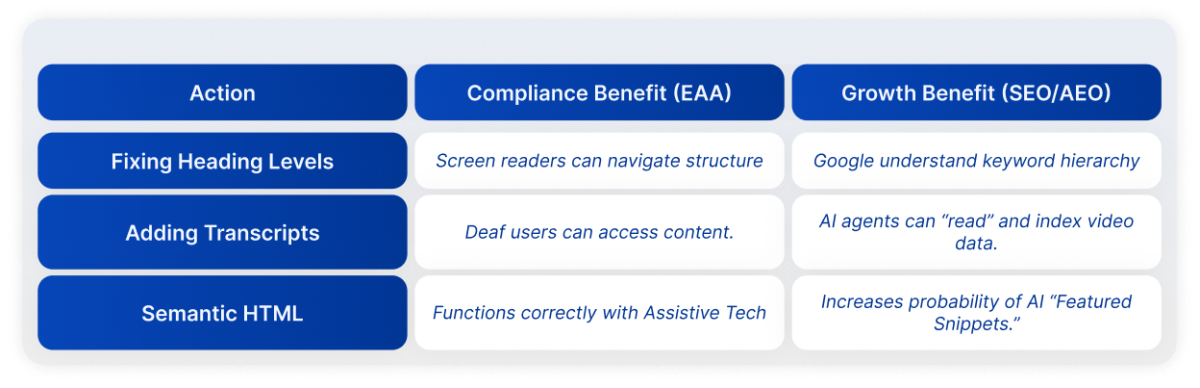
Google’s bots are effectively “blind users.” They navigate your site using code, not visuals.
- Ranking Signal: Google rewards “Page Experience” and “Core Web Vitals.” Accessible code is cleaner, faster, and easier for Google to index.
- The Overlap:
- Heading Tags (H1, H2): Essential for screen readers to navigate content; essential for Google to understand content hierarchy.
- Alt Text: Essential for blind users; essential for Google Image Search rankings.
AEO (Answer Engine Optimisation)
The new frontier of Search.
When a user asks ChatGPT or Google AI Overviews a question, the AI needs to “read” your content to cite you as the answer.
- The Connection: AI models struggle to read messy, unstructured code. They thrive on Semantic HTML (the core of accessibility).
- The Win: If your content is accessible (e.g., uses clear definitions, proper lists, and “speakable” schema), you are significantly more likely to be featured as the Direct Answer in AI search results.
JBi Insight: Think of EAA compliance as “structured data for humans.” It just so happens that AI loves it too.
Summary: The Dual-Impact Strategy
References & Official Sources
- The European Accessibility Act (EAA): Directive (EU) 2019/882.
- UK Public Sector Regulations: The Public Sector Bodies (Websites and Mobile Applications) (No. 2) Accessibility Regulations 2018.
- The Standard: ETSI EN 301 549 V3.2.1 (2021-03).
- The Guidelines: W3C Web Content Accessibility Guidelines (WCAG) 2.2.
- The Business Case: The Click-Away Pound Report (2019).
- Automation Limits: Government Digital Service (GDS) Accessibility Tool Audit (2018).
Next Step:
Governance requires documentation. Ensure your Accessibility Statement is current. If you require a template or a Gap Analysis to benchmark against the incoming v4.1.1 standards, contact the JBi Strategy Team.
Similar Reads
Our latest news articles featuring company insights and what we have achieved so far